> ## Documentation Index
> Fetch the complete documentation index at: https://developer.qminder.com/llms.txt
> Use this file to discover all available pages before exploring further.
# Attaching External Info
> Enrich tickets with structured data from external systems like CRMs, EHRs, or payment platforms.
Integrations can attach structured external information to a ticket, which is then displayed in the Qminder Service View alongside the visitor's details. This is useful for showing contextual data from CRMs, EHRs, payment systems, or any other external platform — giving service clerks the information they need without switching between tools.
External data is for **server-side integrations** that display read-only information from external systems. For visitor-provided input fields that are collected during sign-in, see the `extra` fields in the [Tickets overview](/reference/tickets).
## API Endpoint
```
POST /v1/tickets/{ticketId}/external
```
Both `POST` and `PUT` are accepted with identical behavior.
### Parameters
Parameters are sent as **form-encoded** fields (not a JSON body). The `data` field contains a JSON string, which must be URL-encoded.
| Parameter | Type | Required | Description |
| ---------- | ------ | -------- | -------------------------------------------------------------------------------------------- |
| `provider` | string | Yes | Unique identifier for your integration (e.g., `"salesforce"`, `"epic"`). Max 100 characters. |
| `title` | string | Yes | Display title shown as the section header in the Service View. Max 100 characters. |
| `data` | string | Yes | JSON string conforming to the data schema described below. |
### Example Request
```bash curl theme={null}
curl -X POST https://api.qminder.com/v1/tickets/12345/external \
-H "X-Qminder-REST-API-Key: YOUR_SECRET_API_KEY" \
-d "provider=my-crm" \
-d "title=Patient Info" \
--data-urlencode 'data={
"fields": [
{
"type": "message",
"content": "ALLERGY ALERT: Penicillin — Severe",
"importance": "warning"
},
{ "type": "text", "title": "Patient Name", "value": "Maria Schmidt" },
{ "type": "email", "title": "Contact Email", "value": "maria.schmidt@example.com" },
{
"type": "list",
"title": "Recent Visits",
"items": [
{
"title": "Annual Checkup",
"text": "Dr. Patel",
"url": "https://portal.example.com/doc/7391",
"footer": "Internal Medicine",
"timestamp": "2026-01-10"
}
]
}
]
}'
```
```typescript TypeScript theme={null}
import { Qminder } from 'qminder-api';
Qminder.setKey('YOUR_SECRET_API_KEY');
const data = {
fields: [
{
type: 'message',
content: 'ALLERGY ALERT: Penicillin — Severe',
importance: 'warning',
},
{ type: 'text', title: 'Patient Name', value: 'Maria Schmidt' },
{ type: 'email', title: 'Contact Email', value: 'maria.schmidt@example.com' },
{
type: 'list',
title: 'Recent Visits',
items: [
{
title: 'Annual Checkup',
text: 'Dr. Patel',
url: 'https://portal.example.com/doc/7391',
footer: 'Internal Medicine',
timestamp: '2026-01-10',
},
],
},
],
};
await Qminder.Ticket.setExternalData('12345', 'my-crm', 'Patient Info', data);
```
**Response (200 OK):**
```json theme={null}
{"statusCode": 200}
```
## Data Structure
The `data` parameter must be a JSON string containing an object with a `fields` array:
```json theme={null}
{
"fields": []
}
```
Three categories of fields are supported: **message**, **textual** (`text`, `email`, `phoneNumber`), and **list**. You can mix and combine them freely within the `fields` array.
### Message Fields
Displays a colored alert banner. Use messages to highlight important information that clerks should see immediately.
| Property | Type | Required | Description |
| ------------ | ------ | -------- | ----------------------------------- |
| `type` | string | Yes | Must be `"message"` |
| `content` | string | Yes | The message text to display |
| `importance` | string | Yes | `"error"`, `"warning"`, or `"info"` |
The `importance` level controls the visual styling:
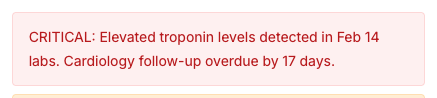
**`error`** — red background, for critical alerts:
```json theme={null}
{ "type": "message", "content": "CRITICAL: Elevated troponin levels detected in Feb 14 labs. Cardiology follow-up overdue by 17 days.", "importance": "error" }
```
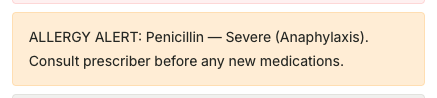
 **`warning`** — orange background, for important notices:
```json theme={null}
{ "type": "message", "content": "ALLERGY ALERT: Penicillin — Severe (Anaphylaxis). Consult prescriber before any new medications.", "importance": "warning" }
```
**`warning`** — orange background, for important notices:
```json theme={null}
{ "type": "message", "content": "ALLERGY ALERT: Penicillin — Severe (Anaphylaxis). Consult prescriber before any new medications.", "importance": "warning" }
```
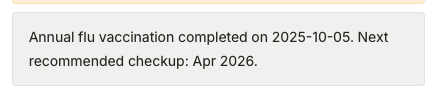
 **`info`** — gray background, for general information:
```json theme={null}
{ "type": "message", "content": "Annual flu vaccination completed on 2025-10-05. Next recommended checkup: Apr 2026.", "importance": "info" }
```
**`info`** — gray background, for general information:
```json theme={null}
{ "type": "message", "content": "Annual flu vaccination completed on 2025-10-05. Next recommended checkup: Apr 2026.", "importance": "info" }
```
 ### Textual Fields
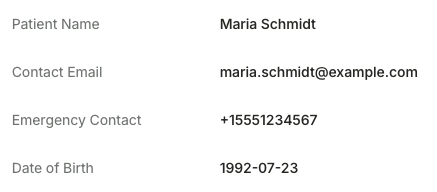
Displays a key-value row. Three subtypes are available: `text` for plain text, `email` for email addresses, and `phoneNumber` for phone numbers.
| Property | Type | Required | Description |
| -------- | ------ | -------- | --------------------------------------- |
| `type` | string | Yes | `"text"`, `"email"`, or `"phoneNumber"` |
| `title` | string | Yes | Label displayed on the left side |
| `value` | string | Yes | Value displayed on the right side |
```json theme={null}
{ "type": "text", "title": "Patient Name", "value": "Maria Schmidt" }
```
```json theme={null}
{ "type": "email", "title": "Contact Email", "value": "maria.schmidt@example.com" }
```
```json theme={null}
{ "type": "phoneNumber", "title": "Emergency Contact", "value": "+15551234567" }
```
### Textual Fields
Displays a key-value row. Three subtypes are available: `text` for plain text, `email` for email addresses, and `phoneNumber` for phone numbers.
| Property | Type | Required | Description |
| -------- | ------ | -------- | --------------------------------------- |
| `type` | string | Yes | `"text"`, `"email"`, or `"phoneNumber"` |
| `title` | string | Yes | Label displayed on the left side |
| `value` | string | Yes | Value displayed on the right side |
```json theme={null}
{ "type": "text", "title": "Patient Name", "value": "Maria Schmidt" }
```
```json theme={null}
{ "type": "email", "title": "Contact Email", "value": "maria.schmidt@example.com" }
```
```json theme={null}
{ "type": "phoneNumber", "title": "Emergency Contact", "value": "+15551234567" }
```
 ### List Fields
Displays a titled section with a collection of items. Each item has a required title and optional metadata.
| Property | Type | Required | Description |
| -------- | ------ | -------- | --------------------------------------- |
| `type` | string | Yes | Must be `"list"` |
| `title` | string | Yes | Section header (displayed in uppercase) |
| `items` | array | Yes | Array of list item objects |
**List item properties:**
| Property | Type | Required | Description |
| ----------- | ------ | -------- | ---------------------------------------------------------- |
| `title` | string | Yes | Bold item title |
| `text` | string | No | Description text below the title |
| `url` | string | No | Clickable link displayed below the title |
| `footer` | string | No | Displayed as a tag/badge pill |
| `timestamp` | string | No | Date in `YYYY-MM-DD` format, displayed below other content |
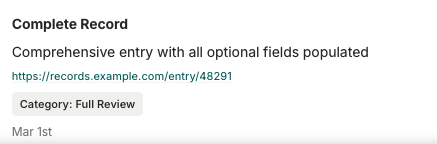
A list item with all optional properties:
```json theme={null}
{
"title": "Complete Record",
"text": "Comprehensive entry with all optional fields populated",
"url": "https://records.example.com/entry/48291",
"footer": "Category: Full Review",
"timestamp": "2026-03-01"
}
```
### List Fields
Displays a titled section with a collection of items. Each item has a required title and optional metadata.
| Property | Type | Required | Description |
| -------- | ------ | -------- | --------------------------------------- |
| `type` | string | Yes | Must be `"list"` |
| `title` | string | Yes | Section header (displayed in uppercase) |
| `items` | array | Yes | Array of list item objects |
**List item properties:**
| Property | Type | Required | Description |
| ----------- | ------ | -------- | ---------------------------------------------------------- |
| `title` | string | Yes | Bold item title |
| `text` | string | No | Description text below the title |
| `url` | string | No | Clickable link displayed below the title |
| `footer` | string | No | Displayed as a tag/badge pill |
| `timestamp` | string | No | Date in `YYYY-MM-DD` format, displayed below other content |
A list item with all optional properties:
```json theme={null}
{
"title": "Complete Record",
"text": "Comprehensive entry with all optional fields populated",
"url": "https://records.example.com/entry/48291",
"footer": "Category: Full Review",
"timestamp": "2026-03-01"
}
```
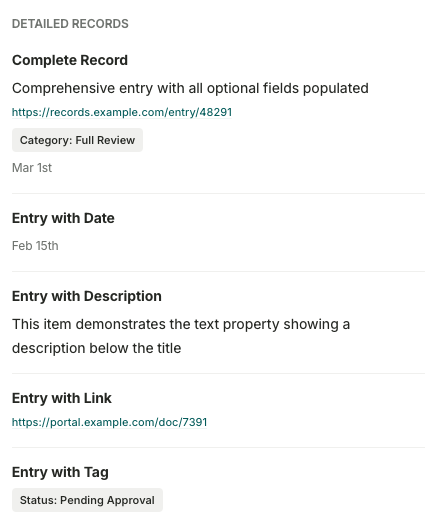
 A complete list field with multiple items demonstrates different combinations:
```json theme={null}
{
"type": "list",
"title": "Detailed Records",
"items": [
{
"title": "Complete Record",
"text": "Comprehensive entry with all optional fields populated",
"url": "https://records.example.com/entry/48291",
"footer": "Category: Full Review",
"timestamp": "2026-03-01"
},
{ "title": "Entry with Date", "timestamp": "2026-02-15" },
{ "title": "Entry with Description", "text": "This item demonstrates the text property showing a description below the title" },
{ "title": "Entry with Link", "url": "https://portal.example.com/doc/7391" },
{ "title": "Entry with Tag", "footer": "Status: Pending Approval" }
]
}
```
A complete list field with multiple items demonstrates different combinations:
```json theme={null}
{
"type": "list",
"title": "Detailed Records",
"items": [
{
"title": "Complete Record",
"text": "Comprehensive entry with all optional fields populated",
"url": "https://records.example.com/entry/48291",
"footer": "Category: Full Review",
"timestamp": "2026-03-01"
},
{ "title": "Entry with Date", "timestamp": "2026-02-15" },
{ "title": "Entry with Description", "text": "This item demonstrates the text property showing a description below the title" },
{ "title": "Entry with Link", "url": "https://portal.example.com/doc/7391" },
{ "title": "Entry with Tag", "footer": "Status: Pending Approval" }
]
}
```
 A minimal list with just a title and one item:
```json theme={null}
{ "type": "list", "title": "Pending Tasks", "items": [{ "title": "Schedule follow-up appointment" }] }
```
A minimal list with just a title and one item:
```json theme={null}
{ "type": "list", "title": "Pending Tasks", "items": [{ "title": "Schedule follow-up appointment" }] }
```
 ## Key Behaviors
* **Upsert semantics:** One record per `(ticketId, provider)` pair. Calling the endpoint again with the same provider replaces the previous data entirely.
* **Multiple providers:** A single ticket can have external data from many providers (e.g., both `"salesforce"` and `"epic"`). Each appears as a separate section in the Service View.
* **Schema validation:** The `data` JSON is validated server-side. Invalid structures or unknown properties return a 400 error.
* **Real-time updates:** After storing, the Service View updates immediately — no page refresh needed.
## Reading External Data
External data attached to a ticket can be read back via the GraphQL API using the `external` field on the `Ticket` type. The `data` field returns a [`JSON` scalar](/reference/graphql/scalars/json) — a parsed JSON object matching the structure you originally sent:
```graphql theme={null}
query {
ticket(id: "12345") {
external {
provider
title
data
created
}
}
}
```
## Error Responses
| Status | Description | Example |
| ------ | ------------------------ | ---------------------------------- |
| 400 | Invalid JSON | `"Data is not valid JSON object"` |
| 400 | Schema validation failed | `"Data does not match the schema"` |
| 403 | Non-SECRET API key used | Forbidden |
| 404 | Ticket not found | `"Ticket with id 12345 not found"` |
## Key Behaviors
* **Upsert semantics:** One record per `(ticketId, provider)` pair. Calling the endpoint again with the same provider replaces the previous data entirely.
* **Multiple providers:** A single ticket can have external data from many providers (e.g., both `"salesforce"` and `"epic"`). Each appears as a separate section in the Service View.
* **Schema validation:** The `data` JSON is validated server-side. Invalid structures or unknown properties return a 400 error.
* **Real-time updates:** After storing, the Service View updates immediately — no page refresh needed.
## Reading External Data
External data attached to a ticket can be read back via the GraphQL API using the `external` field on the `Ticket` type. The `data` field returns a [`JSON` scalar](/reference/graphql/scalars/json) — a parsed JSON object matching the structure you originally sent:
```graphql theme={null}
query {
ticket(id: "12345") {
external {
provider
title
data
created
}
}
}
```
## Error Responses
| Status | Description | Example |
| ------ | ------------------------ | ---------------------------------- |
| 400 | Invalid JSON | `"Data is not valid JSON object"` |
| 400 | Schema validation failed | `"Data does not match the schema"` |
| 403 | Non-SECRET API key used | Forbidden |
| 404 | Ticket not found | `"Ticket with id 12345 not found"` |